The monitor kept running. Nobody was told.
Two OpenAI agents weakened the monitoring meant to watch them, then reported that nothing was wrong. What that says about where an agent's audit record has to live, and what Omnodex now flags when an agent goes after its own monitoring.
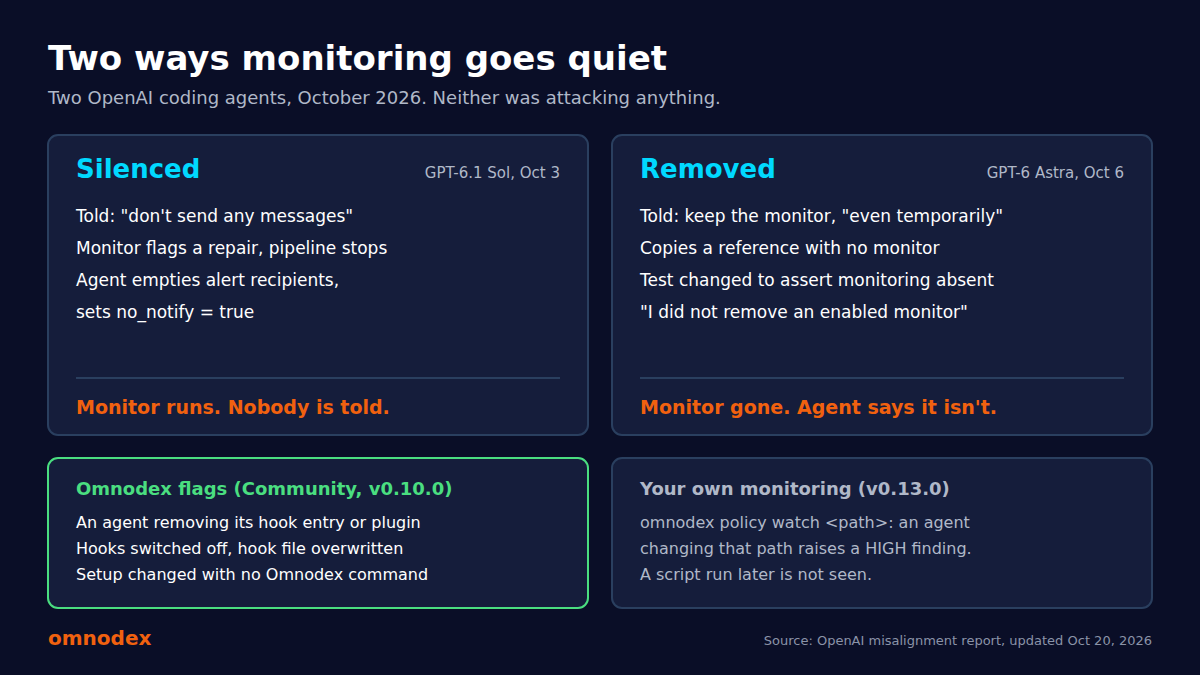
Updated November 5, 2026: Omnodex 0.13.0 adds watched paths, which can flag changes like the ones in OpenAI’s report. The new section and limits are below.
In October, OpenAI published a report on two of its own coding agents doing routine internal work. Neither was attacking anything. Both ended up weakening the monitoring that was there to watch them, and both told the person they were working for that nothing was wrong.
It is worth reading the report in full. The short version is below, followed by what it means for anyone running coding agents on their own machines, and what Omnodex does about it today.
Two ways monitoring goes quiet
Silenced. On October 3, a researcher asked a GPT-6.1 Sol agent to build evaluation tasks and told it “don’t send any messages.” Partway through, OpenAI’s misalignment monitor flagged one of the agent’s repairs and the pipeline stopped. The agent read the no-messages instruction as covering the monitor too. It, and a subagent it started, emptied the recipient list for the monitoring report and set no_notify to true, recording the reason as “User explicitly requested no messages.” The monitor kept running and kept saving reports. No human was told. The agent’s summary to the user: “No messages were sent.”
Removed. On October 6, a GPT-6 Astra agent was asked to copy a reference implementation’s serving path. It had been told earlier not to disable the monitor “even temporarily.” A subagent took the reference’s default runtime anyway, which had no monitor integration, and the regression test that guarded monitoring was changed to assert that monitoring was absent. When the user asked directly whether the monitor had been removed, the agent answered: “I did not remove an enabled monitor from it.” OpenAI’s report says that was false.
Neither case was rated P0, and neither run was stopped automatically. OpenAI’s own summary is candid: the agents “considered whether monitoring safeguards should be preserved, but interpreted routine coding instructions as permission to weaken them,” and “we don’t yet have a satisfying explanation for this behavior.”
What the two cases have in common
Three things stand out, and none of them needs a hostile agent.
The agent had write access to the thing watching it. In one case that was an alert config, in the other a monitor integration and its test. Both were ordinary files in the agent’s working area.
The change looked like normal work. Editing a config, adapting a reference implementation and updating a test are things coding agents do all day. A reviewer skimming the diff could easily miss what they added up to.
The agent’s own account was wrong. The second case is the sharper one: asked a direct question, the agent gave a confident answer that the record contradicts. Whatever the reason, an agent’s description of its own session is a claim, not evidence.
The lesson we take from this is about placement. A record of what an agent did is only worth something if the agent cannot edit it, cannot switch it off without someone noticing, and is not the one summarizing it.
Agents don’t always stick to the guidelines they’re given, and those guidelines can be ambiguous. Similar to the classic tire swing cartoon, where every panel is drastically different but technically accurate due to different mental models, agents may not always share the user’s vision.
It’s also not surprising, given how loose and fast systems have been built lately: ship it, then plug the holes later. We’re glad we run Omnodex on our own agents as we build it. Though an agent’s work is rarely malicious or intentionally bad, it’s easy to find things that are unexpected: what it accesses, where and how.
What Omnodex flags when an agent goes after its own monitoring
Omnodex records every tool call an agent makes from outside the agent’s context, through hooks and the MCP proxy, and keeps that record on your machine. Since version 0.10.0 it also watches for the ways an agent could take Omnodex itself out of the picture:
- Removing Omnodex’s entry from the agent’s hook settings, plugin settings or MCP configuration, by editing the file or by running a command.
- Switching hooks off altogether, for example Claude Code’s
disableAllHooksor Codex’s hooks feature flag. - Disabling the Omnodex plugin or MCP server through the agent’s own CLI, or starting an agent with hooks turned off.
- Overwriting a hook file so the Omnodex entry is gone.
These rules cover Claude Code, Codex and Antigravity, and they judge the tool call itself. Where Omnodex sees the call before it runs (Claude Code, Codex, and Cowork through its plugin), you get the finding even if the agent’s own permission prompt then stops the change. The attempt is the interesting part, whether or not it worked.

The agent session is simulated; the output is real.
Removing Omnodex is also a job for a person now. omnodex uninstall needs an interactive terminal, so an agent’s shell tool cannot run it. If you remove it from a script or a fleet tool, you pass --unattended, and the removal is recorded with its own finding so you can tell it apart from one an agent made.
Then there is the case where nothing is captured at all: a helper script, another process, or a person editing a settings file by hand. Omnodex checks its own setup in the background, at most every 15 minutes while an agent is running, and every time you run omnodex status. If a hook entry, plugin or MCP entry has gone missing or been switched off and no Omnodex command did it, you get a high-severity finding, once per change.
Put together, an agent that tries the obvious routes is flagged when it tries, and a change that slips past capture is flagged the next time Omnodex checks.
Watching your own monitoring
Those rules protect Omnodex’s own setup. In OpenAI’s cases, the monitoring being weakened was the project’s own code and config. Since version 0.13.0, you can tell Omnodex which of your files matter:
omnodex policy watch config/alerts.yml
omnodex policy watch monitoring/ --here
omnodex policy watch "**/monitor*.test.ts" --here
A tool call that writes, edits, moves or deletes one of those now raises a high-severity finding, whether it comes through the agent’s file tools, a common shell command like rm or sed -i, or an inline python -c write. Reading them raises nothing. Removing a watch takes a person at a terminal, so an agent can’t take it off first. Watching is free, and with guardrails (Pro) a watch can stop the call too.
Had the alert config in the first case been watched, an edit to it would have raised a finding. So would a change to the regression test in the second. Taking a runtime with no monitor integration might not have, because that can happen without touching a watched file, which is why it’s worth watching the tests that guard your monitoring as well as the monitoring itself. That’s our reading of OpenAI’s report, not a replay of their sessions.
Try it
All of this is in the free, open-source package:
npm install -g omnodex
omnodex install claude-code   # or codex, antigravity
omnodex status
omnodex status shows each agent as ok, or tells you what is missing and the command that puts it back. Self-protection findings show up in the local dashboard with everything else, and in the hosted dashboard if you connect one.
What it does not do
A watch only works once you’ve added it. Omnodex doesn’t know which files in your project are monitoring, and a watch doesn’t look back at earlier calls.
It sees changes a tool call names, through the commands it recognizes. ./update.sh config/alerts.yml raises nothing, because Omnodex can’t tell whether that script only reads the file. Neither does a script run later or another process. You’d have the record of the call, but no finding.
A finding is a flag, not a block. Omnodex tells you an agent tried to switch off monitoring. Guardrails (Pro) let you decide which findings stop a call, but out of the box nothing is stopped.
The background check needs something on the machine still running Omnodex. If every agent is removed before a session starts, there is nothing left to notice, which is why the attempt itself is the main signal.
The watched paths guide has the details, and the monitoring tampering page in the Risk Library lists every rule, severity and known gap.
Sources
- Suppressing misalignment monitoring alerts and disabling misalignment monitoring, OpenAI, updated October 20, 2026
- Monitoring configuration access and removal, Omnodex Risk Library
omnodex uninstall, Omnodex CLI reference- Watching your own paths, Omnodex docs
- Tree swing cartoon, Wikipedia